TYPESCRIPT · NODE.JS
Drivine
Decorated classes, a typed query DSL whose references come from the classes themselves, and a NestJS module, optional, with @InjectGraphObjectManager.
npm install @liberation-data/drivine
Graph database client for TypeScript, Python & the JVM
Community project by Liberation Data.
NewWatch: graph RAG on any database the video · 4:26THE DIVINE DRIVER
Drivine maps graphs to objects by composition. Declare the view a use case needs, made of node fragments and the relationships between them, and Drivine writes the statement. When you would rather write the Cypher yourself, the persistence manager is still there.
TYPESCRIPT · NODE.JS
Decorated classes, a typed query DSL whose references come from the classes themselves, and a NestJS module, optional, with @InjectGraphObjectManager.
npm install @liberation-data/drivinePYTHON · ASYNCIO
Async first, with a sync API written from it. Pydantic models, a query DSL that stubs generated from your models type, and assemblies with pi-pilgrim.
pip install drivineKOTLIN · JAVA
The graph client for Embabel. Annotated models in Kotlin or Java, a DSL generated by KSP, and Spring Boot auto-configuration with test containers built in.
implementation("org.drivine:drivine4j:0.6.0") COMPOSITION OVER INHERITANCE
A person can play many roles. Rather than one model that serves every use case, declare a view for each, and load it in a single statement.
@NodeFragment maps one node.@GraphView composes fragments and relationships from a @Root.@NodeFragment({ labels: ['Person'] }) export class Person { @NodeId() uuid: string; name: string; bio?: string; } @GraphView() export class PersonCareer { @Root() person: Person; @GraphRelationship({ type: 'WORKS_FOR', target: () => WorkHistory }) employmentHistory: WorkHistory[] = []; } // Everyone whose bio mentions leading const leads = await gom.loadAll(PersonCareer, (q) => ({ where: q.person.bio.containsIgnoreCase('lead') }));
class Person(NodeFragment, labels=["Person"]):
    uuid: Annotated[str, NodeId()]
    name: str
    bio: str | None = None

class PersonCareer(GraphView):
    person: Annotated[Person, Root()]
    employment_history: Annotated[
        list[WorkHistory], Relationship("WORKS_FOR")
    ] = []

# Everyone whose bio mentions leading
q = refs(PersonCareer)
leads = await gom.load_all(
    PersonCareer, where=q.person.bio.contains_ignore_case("lead")
)
@NodeFragment(labels = ["Person"])
data class Person(
    @NodeId val uuid: String,
    val name: String,
    val bio: String?
)

@GraphView
data class PersonCareer(
    @Root val person: Person,

    @GraphRelationship(type = "WORKS_FOR")
    val employmentHistory: List<WorkHistory>
)

// Everyone whose bio mentions leading
val leads = graphObjectManager.loadAll<PersonCareer> {
    where {
        person.bio containsIgnoreCase "lead"
    }
}
IN EVERY LIBRARY
Filters, ordering, keyset paging and index advice, accepted by loads, counts, deletes, patches and grouped reads.
save and saveAll with null policies and replace modes, update, create, patch, cascading deletes, relate and unrelate.
@NodeStamp refuses a save when the node changed since it was loaded, in a stamp format Node, Python and the JVM share.
loadNearest and loadMatching on views and fragments, with one score scale on every engine.
Range, uniqueness, vector and full-text indexes declared on your classes, enforced at startup, with drift detection.
A container for each datasource in CI. While you iterate, USE_LOCAL_NEO4J=true points tests at your own instance.
CYPHER WHEN YOU NEED IT
Load and save through the object manager wherever you can: Drivine writes the statement for each store. For your custom queries, give a persistence manager a Cypher statement. Neo4j, Memgraph, FalkorDB and Neptune run it as written. On Postgres, Oracle and SQLite, Drivine compiles it to SQL over two tables, one of nodes and one of relationships, and gives back the same rows.
MATCH p = (a)-[:KNOWS*]->(:Character {name: 'Jesse'})
          -[:APPEARS_IN]->(e {title: 'Pilot'})
WHERE a.name = 'Hank'
RETURN [n IN nodes(p) | coalesce(n.name, n.title)]

// The row, on Neo4j, Postgres and Oracle:
// ["Hank", "Walter", "Jesse", "Pilot"]
PERFORMANCE
Drivine is built to be fast. There's no lazy loading, no session cache to keep warm and no query for each relationship. A view, with everything related to it, loads in one statement, and a save is one statement too.
Graph Bench uses drivine4j to compare Neo4j, FalkorDB, Oracle and Postgres on a graph of 1.1 million nodes and 4.5 million relationships, with the same Kotlin on each.
Postgres and Oracle have no index-free adjacency: a relationship is a row, found through a B-tree. Out to 275,000 paths, that walk cost them less for each path than Neo4j’s pointers did. What costs them is reading the nodes on the way. The numbers.
DRIVINE STUDIO
Each library writes your model to .drivine/model.json:
npx drivine modelDrivine Studio reads it: drag a view to the canvas and it loads as loadAll does, shows the Cypher, and draws what came back. Or type Cypher and see a graph or rows, on Postgres and Oracle too. It only reads, unless you let a connection write, in a browser or as a desktop app.
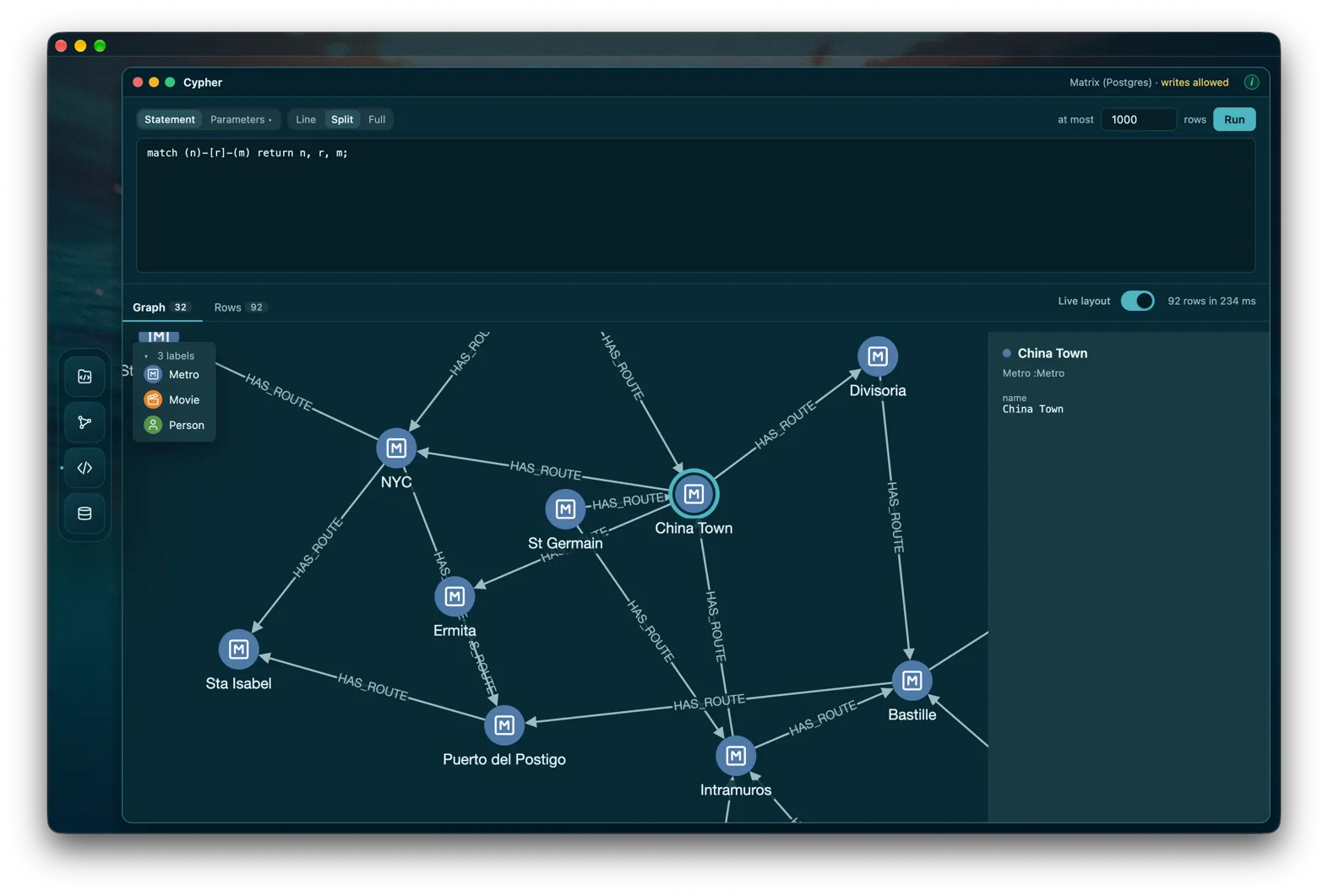
Early days: build it from source for macOS, Windows or Linux.
ENGINES
Dashed: through the persistence manager. SQLite: drivine4j.
Configure a connection, inject the object manager, load your first view.